


Caddy - Second Phone Number
4.6977.00 Reviews
App Specs
- Version
- 1.17.0
- Updated On
- License
- Free
- Downloads
- 100,000+
- Developer
- 800.com, LLC
- Categories
- Communication
- Platform
- Android
Screenshots
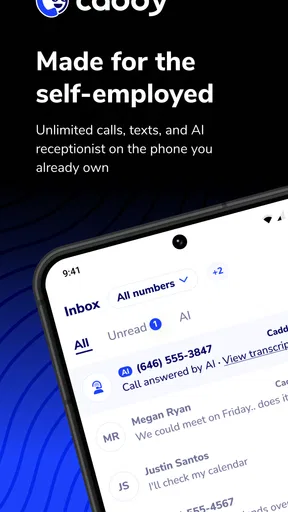
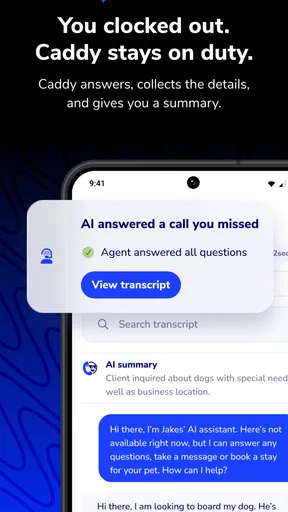
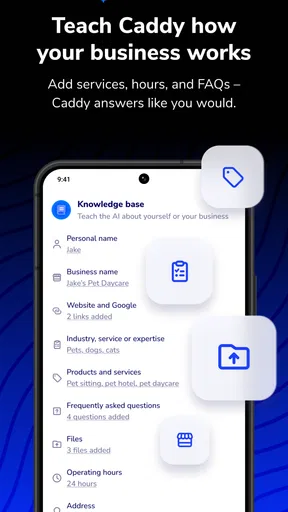
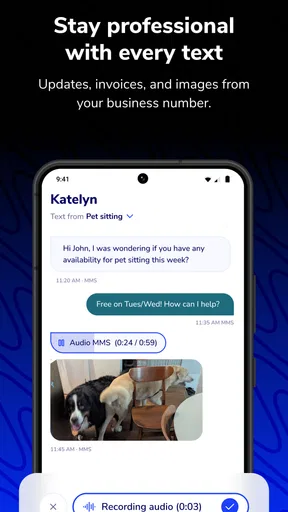
 Analysis by AppCompare
I started using a second-number app because work messages and personal conversations were arriving on the same phone, with no clear signal about which ones needed my attention. Caddy - Second Phone Number is aimed at that everyday problem: it gives calls and texts from a separate number their own place, without making me carry another device. I find the idea most useful not as a way to communicate more, but as a way to decide when and how different people can reach me.
A second number changes the rhythm
My biggest takeaway is that a separate number can make communication feel more deliberate. A customer, a short-term project contact, or someone arranging a local sale does not necessarily need my personal number. Giving those conversations a distinct route makes it easier to recognize their context when they come in and easier to leave them for later when I am off the clock.
That distinction is useful only if I make it part of my routine. I would choose a number for a clear purpose, use it consistently for that purpose, and avoid handing it out indiscriminately. Otherwise, a second inbox can become another place to check rather than a boundary. The number helps organize contact; it does not decide what deserves my attention.
Where it fits among communication apps
Compared with using my regular number for everything, a second number gives me a practical buffer: I can share a contact point for work or a specific activity without making my personal line the default. Compared with carrying a second phone, keeping the extra line in an app is a simpler arrangement when I want both numbers on one device. The trade-off is that the separation is organizational, not physical; both lines still compete for attention on the same handset.
It also serves a different purpose from a group chat or a social messaging account. Those tools are convenient when everyone already uses the same service, but they are not a substitute for a separate phone number when someone expects to call or text. I would choose the option that matches how the other person needs to reach me, rather than trying to move every conversation into one app.
Who will get the most from it
I can see this working well for a freelancer who wants one number for client inquiries, a small business owner who needs a contact point beyond a personal line, or anyone managing temporary conversations that may continue for a while. It can also help when I want to share a number for a local transaction and keep future follow-up apart from family and friends. The benefit is clearest when the second number has a defined job.
I would not recommend it as a cure for constant interruptions. If I answer every call as it arrives and check every text immediately, another number will not create better boundaries by itself. Someone who needs a strict separation between work and personal devices may prefer a second handset, while a person who only wants occasional coordination may find an existing messaging app sufficient.
Worth Reading Before You Choose

EA SPORTS FC Mobile 26 Is a Bigger Football Game, but It Takes Time

Flipboard Shows What News Apps Must Do Beyond the Feed

Switching to Android Auto Means Rethinking Your Driving Routine

Google Calendar Makes a Crowded Week Easier to Manage

Ludo King Makes the Most of the Minutes Between Plans

Baby Panda World Brings Quick Play to Modern Phones, but Its Game Library Feels Busy
A useful everyday workflow
Imagine I am taking inquiries for a weekend side project while also trying to keep my evenings free. I can share the second number with people who need to reach me about that work, use a professional greeting for those callers, and keep those exchanges distinct from personal conversations. When the day gets busy, I can recognize which line a message belongs to before deciding whether it needs an immediate reply.
A small habit makes that workflow more effective: I would save the purpose of the number somewhere easy to remember and tell contacts what kind of messages belong there. I would also review the separate call log and voicemails at a chosen time instead of switching between numbers every few minutes. That turns separation into a routine, rather than a promise the app alone has to keep.
Before relying on a second number for something important, I would test the way I plan to use it: make a call, send a text, and check how the resulting conversation appears in the app. I would also decide what I will do with calls outside my working hours. These simple checks help me spot whether the setup matches my habits before I give the number to a wider circle.
Getting Started with Caddy
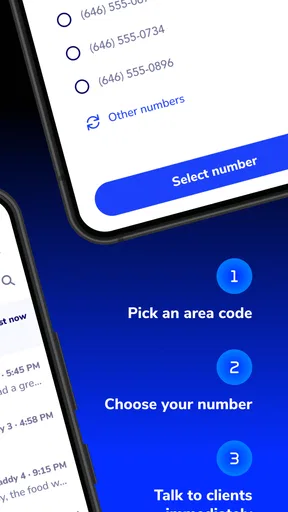
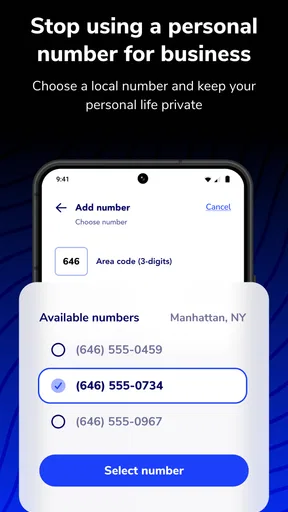
Installation was a breeze. I headed over to the app store, downloaded Caddy - Second Phone Number, and within minutes, I was ready to roll. The app's interface is clean and intuitive, making the setup process straightforward even for the most tech-challenged among us. You start by choosing a new phone number from a range of options, which is a fun little task in itself. I picked one that was easy to remember, and I was good to go.
Features That Stand Out
One of the first things I noticed was how seamless it is to switch between my personal number and the one provided by Caddy. With just a tap, I could manage calls and texts without any hiccups. This feature is a lifesaver for anyone balancing multiple roles or businesses.
The app also offers custom voicemail options. You can set up different greetings for each number, which means you can maintain a professional tone for work calls while keeping it casual for personal ones. It's like having a mini-PA in your pocket!
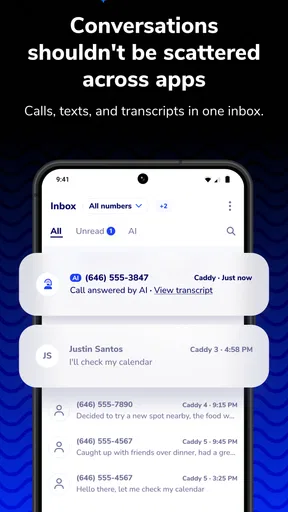
Another highlight is the ability to send and receive texts and pictures. This isn't just about calls, folks. With Caddy, you can manage all forms of communication on one device without crossing the streams. It's all neatly tucked away in its own section of the app, ensuring your personal and professional lives stay untangled.
For me, a separate greeting is more than a polished detail: it is a quick cue that a caller has reached the right line. I would keep the work greeting concise and avoid naming clients or sharing personal details in a voicemail. If I use the number for a short-lived project, I would also update the greeting when that project ends, so callers are not left with a message that no longer fits.
Texts and pictures can make the second line more useful for practical exchanges, such as discussing an item for sale or receiving a reference image for a job. I would still keep sensitive documents and private information off a line shared broadly. The convenience of receiving an image in the same conversation does not change the basic judgment call about what is appropriate to send over ordinary messaging.
Security and Privacy
In today's world, privacy is paramount. Caddy understands this and offers features to keep your information secure. From call blocking to number masking, the app ensures that your second number remains just that—your second number. You can give it out without the fear of it being linked back to your personal details.
Additionally, Caddy doesn't just stop at calls and texts. The app allows you to manage voicemails and access detailed call logs, all while keeping everything under a secure lock. It's like having a digital assistant that respects your privacy as much as you do.
I treat a separate number as a layer of privacy, not a guarantee of anonymity. It gives me a way to avoid sharing my everyday contact number, but I would still think carefully about who receives it and what I say in calls or messages. Blocking unwanted callers can help once a number becomes noisy, though it is better to share the line selectively than to rely on blocking as the main plan.
Call logs and voicemail are most helpful when I use them as a lightweight record of conversations I need to return to. A quick review at the end of a work block can prevent a missed inquiry from disappearing among personal calls. If the second number is for a temporary purpose, I would periodically check whether old conversations still need a reply and whether I should continue using that line for new contacts.
Performance and Usability
I've been using the app for a couple of weeks now, and I must say, it's been rock solid. Calls are clear, texts go through without a hitch, and I haven't noticed any lag or crashes. The app runs smoothly in the background, and I honestly sometimes forget it's there until I need it.
The ability to set business hours is another neat feature. You can define when you're available to take calls, and the app will handle the rest, directing calls to voicemail outside of those hours. It's a great way to maintain work-life balance, especially if you're someone who needs to switch off after a long day.
Business hours are most useful when they match what I can actually maintain. I would set a realistic window, then make sure the voicemail greeting explains when I am likely to respond rather than implying constant availability. For irregular schedules, a simple manual routine may be more suitable than a fixed workday pattern; the point is to make expectations clearer, not to create another setting I have to manage.
There is also a real attention trade-off in keeping both lines on one phone. Even if each conversation has its own section, incoming activity can still interrupt whatever I am doing. I would silence or set aside the work line during focused personal time where that fits my needs, then check it at planned intervals. If urgent calls must always get through, I would decide in advance which contacts or situations justify that exception.
The app is free to download, but it includes in-app purchases, so I would check the available options before building a long-term routine around it. The developer is 800.com, LLC, and the app sits in the communication category. It has a 4.4 average from around 1.1 thousand ratings, with over 100 thousand installs; those figures suggest a sizable audience, but they do not tell me whether a particular plan or workflow will suit my needs.
It is rated for Everyone, and the current version is 1.12.1, with Android 9 as the minimum operating-system requirement. I would check that my device meets that requirement before installing. Since the purchase options range from $9.99 to $299.99 per item, I would look closely at what each option covers and whether it matches how often I expect to use the second line, rather than assuming that a free download means every use is free.
The release date is April 26, 2025, which makes this a relatively recent app. That is worth keeping in mind if I am choosing a number for something essential: I would first try it for a lower-stakes purpose and make sure the call and text workflow feels dependable for me. If a business depends on uninterrupted access, I would compare the app with a dedicated business phone service and keep a backup contact route while evaluating it.
Final Thoughts
In a nutshell, Caddy - Second Phone Number has become an indispensable tool in my daily routine. Whether you're a freelancer, a business owner, or just someone who wants a bit more privacy, this app has something to offer. It's user-friendly, reliable, and packed with features that make managing multiple numbers a breeze.
If you've been on the fence about using a second phone number app, I'd say give Caddy a try. It's a smart solution for anyone looking to simplify their communication without sacrificing privacy or professionalism. Trust me, your phone will thank you.
My verdict is positive for people who want one phone to handle a personal line and a clearly defined second line, especially when calls, texts, pictures, voicemail, and business hours all belong in the same workflow. I would skip it if I need a hard physical divide, if I rarely receive calls or texts outside existing channels, or if an additional subscription-style purchase would not make sense for my use. The app can make communication clearer, but the useful boundary still comes from how deliberately I share and check the number.
Pros
- Easy setup process for new numbers.
- Affordable pricing plans available.
- Clear call quality for all connections.
- Customizable voicemail messages.
- Supports both calls and texts seamlessly.
Cons
- Limited international number options.
- Occasional app crashes reported.
- In-app ads can be distracting.
- No support for landline numbers.
- Requires constant internet connection.
FAQs for Caddy - Second Phone Number
What is Caddy - Second Phone Number and how does it work?
Caddy - Second Phone Number is an app that provides users with an additional phone number for their device. This allows you to separate personal and professional communications without needing a second phone. Once installed, you can choose a number from various available options and use it to make calls, send texts, and more.
Is Caddy - Second Phone Number secure for personal use?
Yes, Caddy prioritizes user privacy and security. The app uses encryption to protect your communications and personal data. It also has features to block unwanted calls and messages, ensuring that your second number is as secure as your primary one.
Can I choose the area code for my second number with Caddy?
Absolutely. Caddy allows users to select from a wide range of area codes, making it easy to find a number that fits your location or desired area. This feature is particularly useful for businesses looking to establish a local presence in different regions.
Does Caddy - Second Phone Number support international calls and texts?
Yes, Caddy supports international calls and texts. Users can communicate globally without hassle, making it an excellent tool for travelers and international business dealings. However, it's important to check any additional charges that might apply for international usage.
What are the costs associated with using Caddy - Second Phone Number?
Caddy offers various pricing plans, including subscription options that cater to different needs. There might be a free trial available, but ongoing use typically involves a monthly fee. It's recommended to review the pricing details within the app to ensure it fits your budget and requirements.


